

http://www.engadget.com/2010/12/27/j...ries-and-tips/
Just got an iPad? The best apps, accessories, and tips
By Paul Millerposted Dec 27th 2010 6:18PM
So, Santa stuffed an iPad into your stocking on Christmas (insert mythical figure / appropriate receptacle / holiday of choice), and you're wondering what to do with the thing? First of all, congratulations! The iPad can be a wonderful, loyal companion and friend, but it can also take a while to warm up to. As we always say, a device is only as good as its apps, both literally and figuratively: it'll take some time to figure out what you want to get from the iTunes Store that will flesh out your experience, but it will also take some time to see which nooks and crannies of your life the iPad can fill, and what roles you'll want it to take over from your laptop and phone. Follow along after the break as we show you how to wring the most out of your shiny new tablet.
iPad apps
Entertainment
Netflix (free). We've probably spent more time watching Netflix than doing anything else on the iPad. The app is free, the service is cheap, and the content is plentiful. The UI isn't as elegant as some of the other apps, but it's what's on the queue that counts.
Hulu+ (free). Another free app, another paid service. Unlike Netflix, Hulu+ has some ads, and it's tough to swallow paying for stuff you might get for free in your web browser, but that doesn't seem to be stopping anybody -- video and the iPad were just meant to be.
Kindle (free). There are plenty of e-book services, all of them with competent iPad apps, but Kindle is our favorite. It syncs beautifully between iPhone, Kindle, iPad, and any other device you might think of, and has a very simple, fast UI.
Zinio (free). Zinio is to magazines what Kindle is to books. Instead of trying something ultra fancy and "magazine 2.0"-ey, Zinio just takes the original magazine layouts and presents them in a simple iPad view. There are free preview articles to get your feet wet, and the magazines themselves cost about the same as print subscriptions and off-the-rack copies will cost you.
Engadget (free). It's free, and it's Engadget. What more do you need to know?
Productivity
Pages ($9.99). This is the MS Word of the iPad. We wish it was a bit smarter about accessing your files (Google Docs sync, anyone?), but the great UI and surprisingly deep feature set makes it the de facto document editor for the tablet.
GoodReader ($2.99). GoodReader works as the bridge between your iPad and wherever you might've stashed your documents online. You can set it up to sync from Google Docs, MobileMe, Dropbox and more, and it has great formatting and annotating abilities for reading and marking up your PDFs or .docs.
Dropbox (free). Dropbox builds its own app for getting files on and off the cloud, and it's very good as well. You lose a bit in functionality, in comparison to GoodReader, but you gain a vastly simpler interface.
Twitter (free). This shouldn't need any explanation, but kudos to Twitter for creating a beautiful and functional #iPadapp.
Adobe Ideas (free). There are plenty of great drawing apps for the iPad (Brushes, Art Studio, and SketchBook come to mind), but Adobe Ideas is free, simple, and very pretty to look at.
Music
Beatwave (free). There are lots of ways to create beats and loops on the iPad, but Beatwave is just fun. It's free as well, though you can pay to unlock further functionality.
Virtuoso (free). Another free gem, Virtuoso is a piano. You get two rows of keys, and you can either use them both yourself (one set as the bass octaves, one for the treble, for instance), or you can flip one row around for use by a friend. "Heart and Soul," here you come!
KORG iMS-20 ($15.99). Want to make some serious music? This synth studio isn't cheap, but it's chock full of "real" equipment to truly go wild with noise and beat creation.
StudioTrack ($39.99). There are plenty of ways to make music with the iPad, but you can record music as well. StudioTrack is a full-on multitrack recorder with a price to match, complete with effects chains and in-depth mixing. It's perfect for "sketching" out song ideas -- with instruments you play on your iPhone, naturally.
Games
Rage HD ($1.99). It's a tough match between Epic's Infinity Blade and id's Rage HD when it comes to best iOS graphics, but Rage HD is the clear winner when it comes to playability on the iPad. It's an on-rails shooter, but has the frantic movement and shooting of a full-on FPS, and on the iPad's large screen it's easy to get immersed.
Solipskier ($0.99). Don't play this game. It will consume you. Your family will never see you again, and you will dream only in ski-slope rainbows.
Zombie Infection HD ($0.99). This is a straight-up ripoff of Resident Evil, but Gameloft creates great ripoffs, and this game is no exception.
Flight Control HD ($4.99). Looking for something a bit more relaxing? Flight Control HD is the Pina Colada of iPad games, with a simple mechanic of drawing lines and landing planes. You can go head to head against a friend on your iPad, or play iPad vs. iPad over WiFi.
Real Racing HD ($9.99). Real Racing HD was one of our favorite games when the iPad was first launched, and it's still great. There's something about the fact that the iPad is about the size of a steering wheel that makes racing games just feel great on the iPad, and this one's the king. However, Real Racing 2 just hit the iPhone, complete with licensed cars and better graphics, so if you're patient you might wait for that version to show up on the iPad as well.
Scrabble ($0.99). If you've got an iPhone and all your friends do too, there's only one thing left to do: play Scrabble. You get a "Tile Rack" app for each phone, and the actual Scrabble app for the iPad, and proceed to play the world's most decadent game of Scrabble.
iPad cases and accessories
Dodocase ($59.95). There are two main categories of iPad cases, and the one you'll choose depends on how you see the device: is it a reading tablet, or is it an everything else tablet? The Dodocase is the perfect example of the former, ensconching your iPad in a handcrafted Moleskine-style book.
Incase Convertible Magazine Jacket ($49.95). This case is more of the latter, taking cues from Apple's own iPad case but adding extra flexibility. It's perfect for propping the iPad up into a typing position, or protecting it from the elements. Just don't expect to impress any of your fellow hipster coffee shop campers.
Apple Keyboard Dock ($69). If you're using the iPad for writing, this dock is pretty much a must. It obviously only allows your iPad to stand vertically, but that makes the most sense for typing anyway. If you want a bit more flexibility, you can buy the iPad dock alone ($29), sans keyboard, and provide your own Bluetooth keyboard.
Pogo Stylus ($14.95). Don't expect this to turn you into Rembrandt, but if you find yourself spending a lot of time in the iPad's myriad quality drawing applications, it can't hurt.
Camera Connection Kit ($29). The iPad can't completely replace your computer (yet), but it can get pretty close with Apple's Camera Connection Kit. The two adapters let you plug in your camera's USB cable or SD card, respectively, allowing you to offload your pictures and upload them to Flickr or Facebook or wherever your heart takes you. New, unofficial kits are also emerging that combine both functions into one adapter.
Tips and tricks:
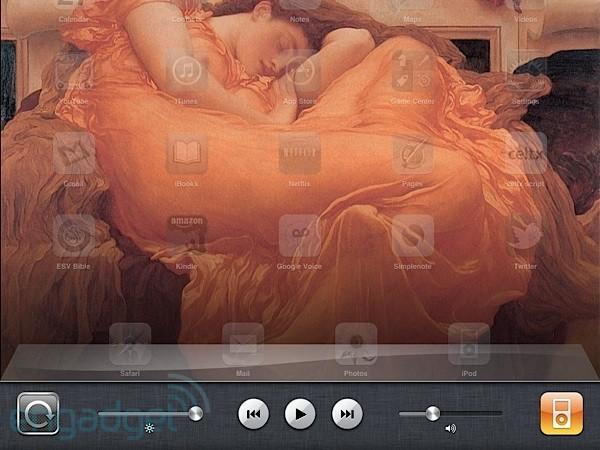
How to lock / unlock the screen rotation: In the beginning there was the orientation lock switch. And it was good. Now Apple has turned that switch into a mute switch and moved to a software lock. It's not the worst hassle, but it can be a major pain if you don't know where to find the software lock. Here's what you do: double tap the home button. That should pull up a list of recently used application (this is for fast switching between apps). You can swipe left to see even older apps, or swipe right to get a little control panel. On the left is the orientation lock / unlock button you were looking for, and there's also easy access to brightness and iPod controls.
Put Gmail on your iPad: Wait is there actually a Gmail app for the iPad? Yes and no. There's no native application, sadly, but Google has built a beautiful web UI for using Gmail on the iPad, and we recommend putting a bookmark on your home screen pronto. To add Gmail (or any website) to your homescreen, simply go to your Gmail in Safari, then tap the button directly to the left of your address bar (it's a box with an arrow coming out of it), then select the "Add to Home Screen" option. You'll get an option to name the application (we stuck with "Gmail), and then you just tap the "add" button and Safari will place the shortcut in with the rest of your iPad apps.
Getting files on and off: Sadly, one of the hardest things to do with the iPad is to put files on it. Then, once they're on, it's just as difficult to get them off. There's no file browser, like on a regular computer, and if you plug the iPad into your computer it doesn't show up as a hard drive, it just shows up in iTunes. No solution is one-size-fits-all, but here are a few of the ways we deal with this major shortcoming.So, that's it from us, but if you've got your own favorite apps, accessories, and trick for the iPad, please sound off in the comments below!
- Email: Yeah, you probably thought of this already, but it's still one of the best ways to get stuff on the iPad. Just email an attached document to yourself, then open it up on the Mail app. You should get a nice thumbnail of the document, and then when you tap it, Mail will open its own preview of that document if it can. If you just wanted to view the file, that should be fine, but if you want to work on it, tap the button in the top right corner (the box with the arrow coming out of it) and you should get an option to open the file in the default application for that file type, along with an "open in..." button that lets you pick from any other applications you might have that will work with that file. After that it will be up to your application of choice how it deals with the file. If you get stuck you can always go back to the Mail app, where the original document will be waiting for you, untouched.
- iTunes: It's surprisingly easy to miss, but Apple actual built some minor file management features into iTunes. Once you plug your iPad into your computer and open iTunes, you get all sorts of tabs for managing your music and movies and everything else on your device. The "apps" tab allows you to arrange applications and remove them from your device, but if you scroll down you get a "file sharing" list of applications that can give and receive documents. You simply click on the application you'd like to share a file with, tap "add," and upload a file from your computer. Similarly you can select files already on your iPad and save them to your computer from this interface.
- GoodReader: There are other applications that sync files to the "cloud," but GoodReader is our favorite. You simply set it up with your Google Docs, Dropbox, MobileMe or even email account, and you can download files straight to your device and view them from within GoodReader. GoodReader also has an "Open in..." functionality for viewing and editing your files in other applications. You can sort your files into folders, download files off of websites, and connect to local servers over WiFi if you're really desperate for the digital good stuff.
- Dropbox: If you're a Dropbox user, this is by far the simplest solution, providing a simple view of your online files, a lightweight viewer, and an quick shortcut to opening files in other applications.If you're not a Dropbox user, this won't do you much good.
Results 1 to 18 of 18
-
28-12-2010, 12:36 PM #1Out there...



- Join Date
- Jul 2009
- Last Online
- @
- Location
- BKK
- Posts
- 40,029
Just got an iPad? The best apps, accessories, and tips
"Slavery is the daughter of darkness; an ignorant people is the blind instrument of its own destruction; ambition and intrigue take advantage of the credulity and inexperience of men who have no political, economic or civil knowledge. They mistake pure illusion for reality, license for freedom, treason for patriotism, vengeance for justice."-Simón Bolívar
-
28-12-2010, 12:57 PM #2I'm in Jail


- Join Date
- Mar 2006
- Last Online
- 12-06-2021 @ 11:13 PM
- Posts
- 39,826
nice,
my Apple wireless keyboard works perfectly under Unbuntu Linux but fail under iPhone, go figure
-
28-12-2010, 12:58 PM #3Thailand Expat

- Join Date
- Jun 2005
- Last Online
- 18-06-2026 @ 12:33 PM
- Location
- Udonstani
- Posts
- 34,824
Here's the best one for the iPad.
-
28-12-2010, 05:46 PM #4Member


- Join Date
- Nov 2009
- Last Online
- @
- Location
- Bangkok
- Posts
- 38,003
^ and Papillion (head cranking rather than anally asserted...)
-
28-12-2010, 05:47 PM #5Knows fok all

- Join Date
- May 2006
- Last Online
- @
- Location
- Kent
- Posts
- 5,222
one password and dropbox use them all the time.
-
28-12-2010, 06:09 PM #6I'm in Jail
- Join Date
- Mar 2006
- Last Online
- 12-06-2021 @ 11:13 PM
- Posts
- 39,826
there are some nice apps, but they all very buggy, many don't really work or just crashed when over used
nothing unusual, it's an apple product after all
-
29-12-2010, 03:56 AM #7Thailand Expat

- Join Date
- Sep 2009
- Last Online
- @
- Posts
- 108,195
Don't forget that Wikileaks application. Oh, hang on.
-
29-12-2010, 12:34 PM #8sabaii sabaiiGuestFFS It's just a laptop with no lid !
 Originally Posted by StrontiumDog
-
30-12-2010, 07:59 AM #9Thailand Expat
- Join Date
- Sep 2009
- Last Online
- @
- Posts
- 108,195
Bog off, it's not that useful. Originally Posted by sabaii sabaii

-
30-12-2010, 05:37 PM #10Member

- Join Date
- May 2010
- Last Online
- 22-05-2014 @ 12:53 PM
- Location
- Macau
- Posts
- 492
Rage abd Infinity Blade have great graphics but are extremely repetitive and lack any real game play
-
30-12-2010, 06:56 PM #11Member

- Join Date
- Dec 2010
- Last Online
- 19-02-2026 @ 09:04 PM
- Location
- chiang mai
- Posts
- 466
Another great con job from the good folks at Apple. They just yell out 'Hey all you saps you just gotta have this!" then stand back and wait for the stampede.
-
30-12-2010, 11:32 PM #12Out there...
- Join Date
- Jul 2009
- Last Online
- @
- Location
- BKK
- Posts
- 40,029
^ So you wont be buying one?

Well, they must be doing something right...?
I don't own one...but the iPad 2 is looking nice...Just thought I'd pass this along to anyone who does have one....
-
31-12-2010, 10:17 AM #13Thailand Expat
- Join Date
- Sep 2009
- Last Online
- @
- Posts
- 108,195
In the eyes of vacuous, style loving iTards, they can't do anything wrong. Even a fucked antenna didn't put them off their crappy iPhones. Originally Posted by StrontiumDog
They'll buy any old shit Apple chuck at them.
What Steve the ninja is doing absolutely right is marketing useless, but pretty tools to witless tools.
-
31-12-2010, 11:18 AM #14I'm in Jail
- Join Date
- Mar 2006
- Last Online
- 12-06-2021 @ 11:13 PM
- Posts
- 39,826
it's all about appeal to our inner gayness,
-
31-12-2010, 11:27 AM #15Days Work Done!
- Join Date
- Oct 2007
- Last Online
- Today @ 10:24 AM
- Location
- Roiet
- Posts
- 36,068
Happy New Year Butters. Some more iPad apps to appeal to your inner gayness.
"To help you navigate through the crowded showroom of iPhone, iPod touch, and iPad mini-programs, here is a list of the top gay apps:- Gay History Project
Release Date: June 23, 2009
Price*: $2.99
This app includes over 150 LGBT historical events, places and influential people. Users can also share personal stories in the app forum. - MyGayGo
Release Date: March 21, 2009
Price*: $2.99
This directory features over 25,000 LGBT-friendly businesses from hair salons to hotels and LGBT support services. Businesses are listed based on your current location. - Grindr
Release Date: July 8, 2009
Price*: Free (with ads); $2.99/month (ad free)
Find a date on the go with this free location-based app. No logins are necessary. Just upload a picture, profile details and find men in your area. - Gay Quotes
Release Date: May 29, 2009
Price*: $1.99
A tap or shake puts inspirational to witty quotes from notable LGBT people at your fingertips. Show off your LGBT history skills or pass the time with quotes atop historical and landmark images. - GayInternetRadioLive (G.I.R.L)
Release Date: March 17, 2009
Price*: Free
Get a 24 hour live dance music and remix stream over your 3G network. Quality options include 128k and 64k. - GayCities
Release Date: February 9, 2009
Price*: Free
Find LBGT-friendly restaurants, beaches, and bars in your area. This location-based guide also features pin-drop mapping."
"Whenever you find yourself on the side of the majority, it is time to pause and reflect,"
-
31-12-2010, 07:41 PM #16Member
- Join Date
- Jan 2010
- Last Online
- 09-06-2011 @ 02:06 AM
- Posts
- 550
I'm an Apple fan, but I don't own an Iphone or an Ipad. But, I do love my G5 and can not wait for the G6 tablet. In terms of artistic creativity you so restricted using a keyboard and mouse. Especially in musical applications.
I'll give it to Apple. The introduction of touchscreen technology is a leap forward in terms of the user inputing data into a computer. Did any of you guys check Jeff Hans introduction into pressure sensitive touchscreen tech in 2006?.
-
01-01-2011, 06:18 AM #17Thailand Expat
- Join Date
- Sep 2009
- Last Online
- @
- Posts
- 108,195
:facepalm: Originally Posted by hopskimoet
-
02-01-2011, 09:04 AM #18Thailand Expat
- Join Date
- Jun 2005
- Last Online
- 18-06-2026 @ 12:33 PM
- Location
- Udonstani
- Posts
- 34,824
Especially an Apple mouse. Originally Posted by hopskimoet
If only touchscreens were available on non-Apple products... Originally Posted by hopskimoet




 Reply With Quote
Thread Information
Users Browsing this Thread
There are currently 1 users browsing this thread. (0 members and 1 guests)
