
Hi everyone, so you want to know how to post a pic on this forum. It is quite simple but until you know how it might seem daunting.
First off I want to encourage you to use the Teakdoor Gallery as your image host because it really is quite easy and will automatically resize your pic to a forum friendly size and look really snazzy. Of course, you can use your own image host or hotlink but if you have not sized your pic it may stretch your post and be way to big to be viewed properly.
As a Teakdoor member you are entitled to your own free User Gallery.
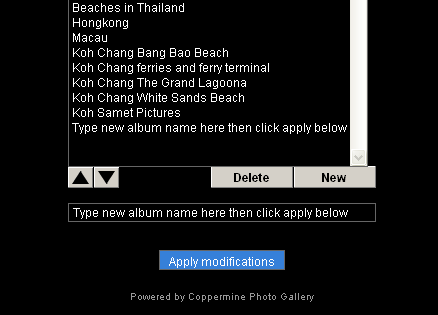
Goto the gallery, click create/order my gallery, then click new, and then type the name of the album, ie motorbike pics album, then click apply modifications and then your away
(note, this has several galleries already that have been created)
Place your mouse cursor over the little house on the top left and more optins will open, Then Click on 'Upload file' and you will be taken to the upload page where you can use either the browse function or paste in a url.
Once you have selected the pic that you would like to upload to your gallery (by either double left clicking the pictures name, or single left click and then "Open".
When you have the pics listed you want to upload simply click 'Continue' and you will only have to wait a few seconds while the Gallery grabs the pic.
I have used this pic just as an example.
You will then have the 'successful upload' page come up.
Now choose the album you want to store your picture in.
Add any picture description you want or keywords and stuff to help you find it in the future.
Again, click 'Continue' and in just a few more seconds be taken to the Gallery with your pic now successfully loaded into your gallery.
The gallery has 'Random files' appearing at the top and your pictures shown in 'Last additions'.
So now you want to post the pic on the forum or maybe somewhere else on the net.
All you need to do is simply left click on the image that you want to post, if you want the largest size left click your image that is now at the top again.
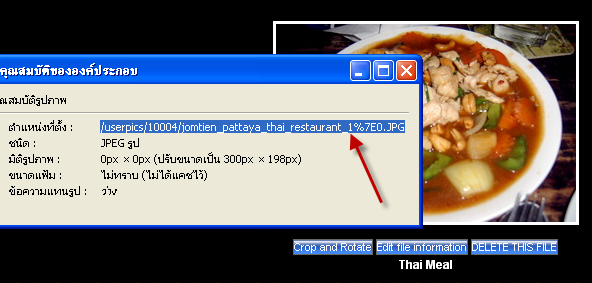
Now right click the image,scroll down to properties, left click and highlight the url, easiest is to double left click it and then copy it.
For firefox users just right click and copy the image location.
Navigate to where you want to paste the pic on the forum and click the little box with the mountains and yellow sky, in the new box that opens up take out the http:// and put in your url.
It really is quite simple once you have done it a few times and gotten used to it.
If you have any specific questions, please post them here and I will do my best to answer your query.
Have fun.
__________________
Donate at Teakdoor
shamelessly stolen from the captain and edited by me


Results 1 to 25 of 198
Thread: How to post a picture
-
23-02-2006, 02:34 PM #1

R.I.P.



- Join Date
- Jun 2005
- Last Online
- @
- Location
- Pattaya Jomtien
- Posts
- 58,763
How to post a picture
-
23-02-2006, 02:40 PM #2Thailand Expat
- Join Date
- Nov 2005
- Last Online
- @
- Posts
- 22,684
Again you just gotta love it!! Originally Posted by dirtydog
-
23-02-2006, 03:18 PM #3I am in Jail

- Join Date
- Oct 2005
- Last Online
- 14-05-2014 @ 05:06 PM
- Posts
- 6,815
I think AO has the same technical abilities that I have. I keep being told, 'you have no album' or something like that. I dont think I get all the options.
-
23-02-2006, 03:35 PM #4Newbie

- Join Date
- Jun 2005
- Last Online
- @
- Posts
- 159
^
hmmmm Originally Posted by dirtydog
-
23-02-2006, 06:17 PM #5Thailand Expat
- Join Date
- Jun 2005
- Last Online
- 20-09-2006 @ 09:55 PM
- Posts
- 2,975
The dog says 'shamelessly' but he knows I couldnt give a rats nad if he reposts my gear. It was the dog that asked me to post this as a tutorial in the first place. It really is very simple to post pics on this forum and putting this info in the caps lounge gives it more exposure. We want everyone to feel free to post their pics. Kinda counting on it actually AO. So please have a go at it. Originally Posted by aging one
The longest journey begins with the first step so get your head around posting pics.
Palease!!!! :wai:
-
23-02-2006, 07:23 PM #6Thailand Expat
- Join Date
- Nov 2005
- Last Online
- @
- Posts
- 22,684
Lilly you are so right. But at the same time CS has taken the time to give me a tutorial. The day after I picked him up he tried like hell to teach me how to upload an avatar, even though at that time my computer had more virus than RAM. Needless to say I ended up with a picture of my kids in the thread test here. So I am hoping to get something posted soon.
Plus CS has been asking me to post pictures and I should. This community is growing and I for one am enjoying meeting fellow posters, and looking forward to meeting more, especially in Chaing Mai, and Pattaya/Jomthien.Last edited by aging one; 23-02-2006 at 07:25 PM.
-
23-02-2006, 07:43 PM #7punk douche bag

- Join Date
- Aug 2005
- Last Online
- @
- Location
- o dan y bryn
- Posts
- 29,256
AO
I saw your name as the last poster on this thread and was really hoping you'd gone and posted a real life pic.
Alas...
You can steal some of mine from my gallery if you like...
-
23-02-2006, 08:11 PM #8
R.I.P.
- Join Date
- Jun 2005
- Last Online
- @
- Location
- Pattaya Jomtien
- Posts
- 58,763
you got the pics of your naked wife in there yet

-
23-02-2006, 08:26 PM #9A bladdy woman

- Join Date
- Jul 2005
- Last Online
- 29-04-2009 @ 05:13 PM
- Location
- Somewhere I belong but it won't be last long
- Posts
- 4,247
What about ImageReady?

Does anyone know how to use it? or I should start a new thread.
-
23-02-2006, 08:31 PM #10
R.I.P.
- Join Date
- Jun 2005
- Last Online
- @
- Location
- Pattaya Jomtien
- Posts
- 58,763
here you go gow
http://graphicssoft.about.com/od/photoshoptutorials/
-
23-02-2006, 08:52 PM #11A bladdy woman
- Join Date
- Jul 2005
- Last Online
- 29-04-2009 @ 05:13 PM
- Location
- Somewhere I belong but it won't be last long
- Posts
- 4,247
Thank you, DD.
I just wonder why I put pink in one pic and green in another pic and then make it to gif file but when I save and view it, it doesn't look pink or green, only brown / gray.
-
23-02-2006, 11:03 PM #12Thailand Expat

- Join Date
- Jun 2005
- Last Online
- 08-09-2014 @ 10:43 AM
- Location
- Simian Islands
- Posts
- 34,827
You're probably using indexed GIF files - you need to convert to RGB first.
Or better still use bitmaps and save the entire animation as a GIF.
-
23-02-2006, 11:28 PM #13A bladdy woman
- Join Date
- Jul 2005
- Last Online
- 29-04-2009 @ 05:13 PM
- Location
- Somewhere I belong but it won't be last long
- Posts
- 4,247
Ok, I'll try again.
-
23-02-2006, 11:34 PM #14A bladdy woman
- Join Date
- Jul 2005
- Last Online
- 29-04-2009 @ 05:13 PM
- Location
- Somewhere I belong but it won't be last long
- Posts
- 4,247
Aha.. I got it!
-
24-02-2006, 02:44 AM #15Banned


- Join Date
- Dec 2005
- Last Online
- @
- Location
- HELL
- Posts
- 4,774
Alright... I'm a techo-geek and I still can't find the "Upload" Link...
Created an Album, clicked Continue and then no Upload link anywhere... WTF...
-
24-02-2006, 09:09 AM #16Thailand Expat
- Join Date
- Jun 2005
- Last Online
- 08-09-2014 @ 10:43 AM
- Location
- Simian Islands
- Posts
- 34,827
^ Place your cursor over the little picture of a house, and some options will appear.
-
24-02-2006, 09:19 AM #17Thailand Expat

- Join Date
- Nov 2005
- Last Online
- 25-03-2014 @ 05:29 PM
- Location
- yes
- Posts
- 32,025
yes, that bit fooled me for a while!!
-
24-02-2006, 03:52 PM #18
R.I.P.
- Join Date
- Jun 2005
- Last Online
- @
- Location
- Pattaya Jomtien
- Posts
- 58,763
Bumpity bump. read and learn
-
27-02-2006, 07:05 PM #19Thailand Expat

- Join Date
- Feb 2006
- Last Online
- 23-02-2019 @ 07:59 PM
- Posts
- 1,385
Dear all,
Having a problem with attaching my avatar of Eric the King - please help
-
27-02-2006, 07:08 PM #20punk douche bag
- Join Date
- Aug 2005
- Last Online
- @
- Location
- o dan y bryn
- Posts
- 29,256
Perhaps you'd get more response if you loied about the avatar...
BTW, what is your trouble?
-
27-02-2006, 09:22 PM #21Thailand Expat
- Join Date
- Jun 2005
- Last Online
- 08-09-2014 @ 10:43 AM
- Location
- Simian Islands
- Posts
- 34,827
Good! Originally Posted by cantona

-
27-02-2006, 09:25 PM #22A bladdy woman
- Join Date
- Jul 2005
- Last Online
- 29-04-2009 @ 05:13 PM
- Location
- Somewhere I belong but it won't be last long
- Posts
- 4,247
I can help you you, cantona.
hmm... if you don't have the piccie of Eric the King, I got some!
and I also got some piccies of a guy who looks like Cantona too.

-
27-02-2006, 09:56 PM #23Thailand Expat
- Join Date
- Jun 2005
- Last Online
- 08-09-2014 @ 10:43 AM
- Location
- Simian Islands
- Posts
- 34,827
I think he's got the pictures. Unfortunately for him, he seems to have a Manc intellect as well, so he can't set his avatar up.
-
27-02-2006, 10:18 PM #24A bladdy woman
- Join Date
- Jul 2005
- Last Online
- 29-04-2009 @ 05:13 PM
- Location
- Somewhere I belong but it won't be last long
- Posts
- 4,247

-
27-02-2006, 10:28 PM #25RIP

- Join Date
- Jul 2005
- Last Online
- @
- Location
- Nonthaburi
- Posts
- 4,382
Try putting up Eric the Spade from Hollywood bars in Nana
That would be much more entertaining





 Reply With Quote
Thread Information
Users Browsing this Thread
There are currently 1 users browsing this thread. (0 members and 1 guests)
